.png)
What’s New:
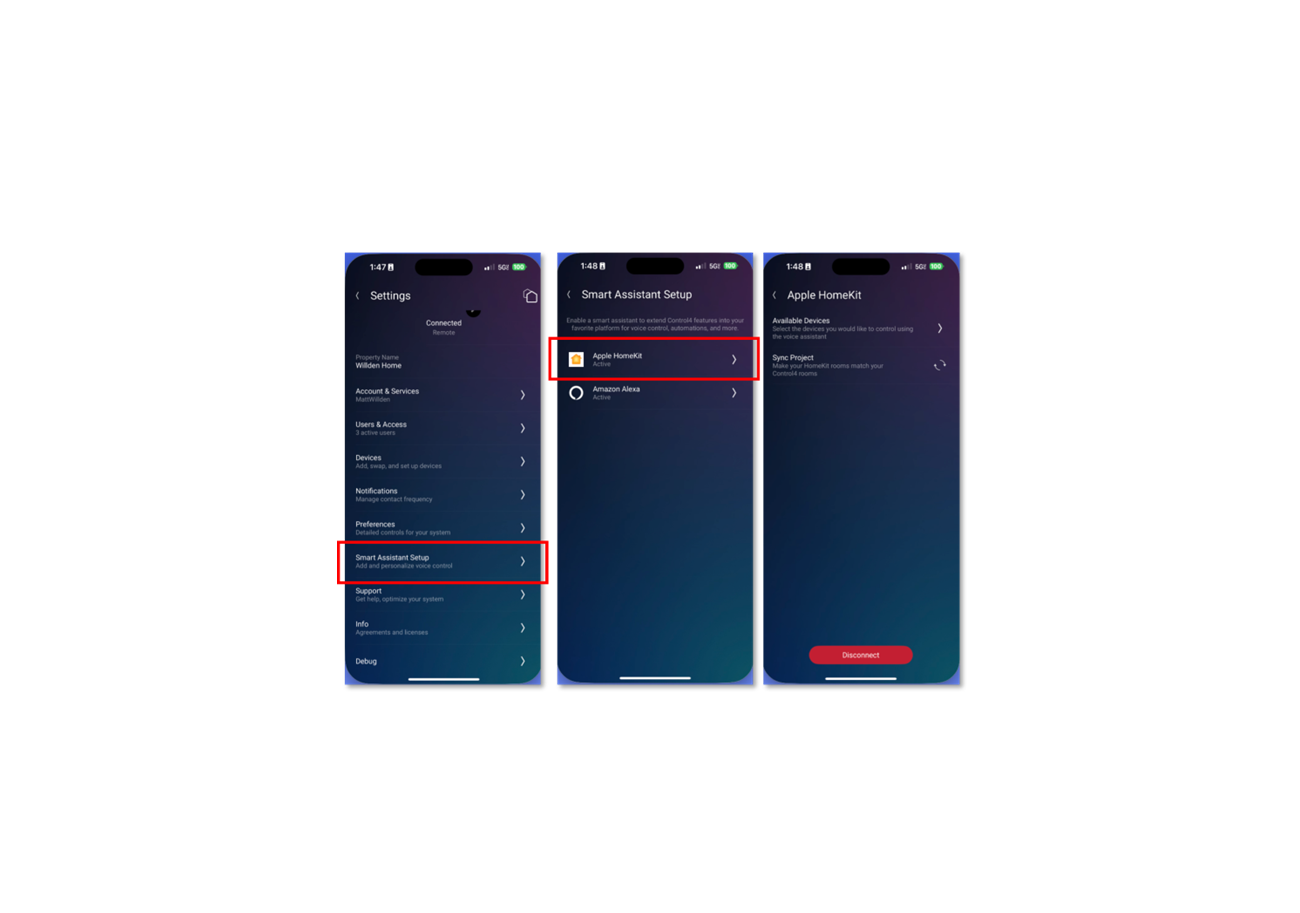
- In-App HomeKit Setup - Easily enable HomeKit from the Control4 app (iOS only) using a step-by-step setup wizard.
- Smart Assistant Setup - A new menu under Settings replaces the old “Voice” section, reflecting broader assistant support.
- Automatic Device Syncing - Control4 devices are automatically added to the Apple Home app during setup, with room mapping that makes Siri voice commands feel natural.
- Device Selection - After setup, you can choose which devices are shared with Apple Home—perfect for privacy or keeping under Apple’s 135-device limit.
- Works with Siri and More - Once connected, you can control your Control4 system using Siri on iPhone, HomePod, Apple Watch, CarPlay, Apple TV, and other Apple devices.
Supported Devices:
- Lights (including color and tunable white)
- Lighting Scenes (shown as switches)
- Thermostats (native Control4 only)
- Blinds and shades (open/close and percentage control)
- Fans (on/off and speed)
- Contact sensors (doors, windows, motion, etc.)
- Smoke detectors
- Voice Scenes (triggered through Siri, created in Composer)
.png)